
The Rise of AI-Powered Web Agencies: How to Stay Relevant and Profitable
There is a growing conversation in the digital world claiming that AI will replace web agencies entirely. With tools like Framer AI, Wix ADI, GPT-powered site builders, Midjourney, and auto-generated branding kits, building a website seems faster and more automated than ever. So—does this mean web agencies are becoming irrelevant? Absolutely not.
The truth is: web agencies are not dying — they are evolving. The agencies that understand how to apply AI strategically are not only staying relevant but becoming more profitable and scalable than before.
1. Agencies Are Shifting From “Builders” to “Strategists”
While AI can generate pages and layouts, it cannot define:
- Business positioning
- Customer segment priorities
- Messaging and emotional tone
- Sales funnel architecture
- Growth strategy
Businesses still need expert guidance to answer:
- Who is our ideal customer?
- How do we convert them?
- What makes our offer compelling?
AI accelerates execution, but human strategy drives direction.
2. Agencies Are Becoming Complete System Integrators
A modern online presence is more than a website.
It requires:
- CRM + lead automation
- Email/SMS nurturing sequences
- Retargeting funnels
- Analytics & tracking dashboards
- Performance optimization
AI can automate individual tasks, but it cannot design a cohesive customer journey.
AI-powered agencies:
- Select the right platforms
- Integrate business systems
- Build conversion pipelines
- Measure and improve acquisition results
This transforms agencies into digital growth partners, not just designers.
3. AI Is Increasing Agency Output, Speed, and Profit
Instead of being replaced by AI, agencies are using it to:
- Write content drafts instantly
- Generate branding concepts in seconds
- Produce layout variations fast
- Automate testing and QA workflows
- Repurpose content for social channels
What took weeks now takes days or even hours.
This results in:
- Higher productivity
- Leaner teams
- Larger project capacity
- Better profitability
AI is not competition. AI is leverage.
4. Recurring Revenue Becomes the Sustainability Engine
The agencies thriving today are not relying on one-time website projects.
They build monthly retainer systems through:
- SEO and ongoing content
- Conversion rate optimization
- Paid ads management
- Analytics reporting and insights
- CRM automation & maintenance
- Website security and reliability care plans
This shifts the relationship from vendor to long-term growth partner.
The result: predictable, stable income.
5. Niche Specialization Is the Competitive Advantage
The new market favors experts, not generalists. Winning agencies specialize in one industry and offer repeatable solutions, such as:
- Healthcare clinic patient acquisition websites
- Real estate agent brand lead funnels
- Coaches and course creator sales pages
- Local business authority websites
- SaaS onboarding experience optimization
Niches allow agencies to:
- Charge premium pricing
- Win clients faster
- Reuse proven systems
- Dominate specific search & referral networks
Specialization protects relevance.
6. AI Enables Agencies to Offer New High-Value Services
AI is not just making processes faster — it is creating new offerings agencies never had before:
- AI-powered customer support chatbots
- Predictive user analytics
- Personalized on-site experience flows
- Automated social video content systems
- AI-driven brand tone and messaging frameworks
Clients do not pay for the tool. They pay for the result.
Framer vs Elementor: A Complete Guide to Choosing the Right Website Builder

Before You Decide — Here’s Why This Comparison Matters
1. Overview of Both Platforms
Framer
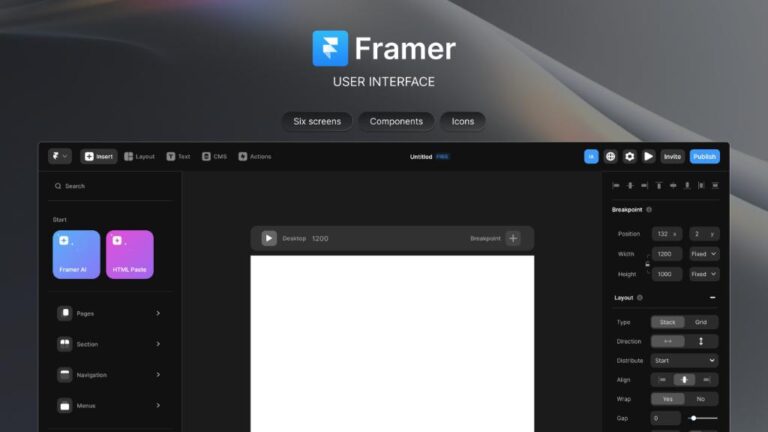
Originally created as a prototyping tool for UI/UX designers, Framer has evolved into a full-fledged website builder. It allows designers to create production-ready websites using a visual interface powered by React and modern web technologies. Framer stands out for its smooth animations, real-time editing, and code-level precision, appealing strongly to designers who value pixel-perfect control.
Elementor
2. Design Flexibility and Interface
Framer emphasizes modern design principles, providing fluid layouts, motion effects, and responsive controls that feel native to high-end UI design tools like Figma. The platform’s real-time collaboration feature lets teams co-create efficiently, and everything built is automatically responsive across devices.
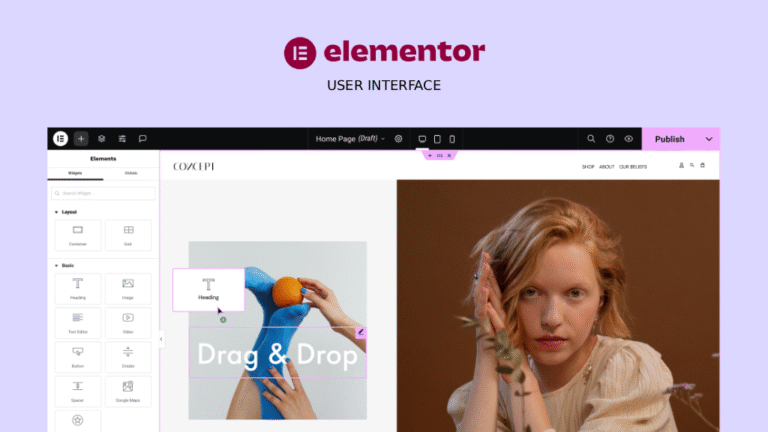
Elementor, while extremely flexible, can sometimes feel more template-driven. However, its drag-and-drop editor is intuitive even for beginners, and it offers hundreds of pre-made blocks and themes. Designers with basic web experience can achieve visually stunning results without touching code — though advanced animations or layouts might require additional plugins.
3. Performance and Speed
4. Ease of Use and Learning Curve
Elementor wins for sheer ease of adoption. Anyone familiar with WordPress can start building a site within minutes. Its interface is straightforward, supported by thousands of tutorials, templates, and community forums.
Framer, on the other hand, has a slightly steeper learning curve, especially for those unfamiliar with design tools or modern UI workflows. However, once mastered, it offers a creative freedom that few platforms can match. Designers who’ve used Figma or Sketch often find Framer’s workflow familiar and inspiring.
5. Integrations and Ecosystem
6. SEO and Marketing Capabilities
7. Pricing and Ownership
8. Future Outlook
Looking Back at 2024 in Website Designing & Development: A Year of Transformation and Innovation.

Website design trends of year 2024
1. AI-Driven Design: The Game-Changer of 2024
One of the biggest highlights of 2024 has undoubtedly been the rise of AI-powered design tools. Artificial Intelligence has moved from being a futuristic concept to an indispensable tool for designers and developers alike. In 2024, AI has not only streamlined workflows but also redefined how websites are created.
- AI-Powered Personalization: AI's ability to personalize user experiences has been a major milestone. Websites are now able to dynamically adjust layouts, content, and even colors based on user behavior and preferences. This level of customization has made browsing more engaging and tailored to individual users, ensuring higher retention and satisfaction.
- Smarter Website Builders: Tools like Wix ADI (Artificial Design Intelligence) and Adobe Firefly have become even more intuitive, allowing non-designers to create beautiful websites with minimal effort. These AI-driven platforms analyze user input, generate design layouts, and even suggest improvements, reducing the design process time significantly.
- AI-Generated Content: Content creation has also seen a shift, with AI tools capable of writing blog posts, creating product descriptions, and even generating visual content. The ability to automate these tasks has freed up designers to focus on more creative aspects of a website’s development.
2. Immersive Web Experiences: 3D, AR, and VR Take the Lead
- 3D Design for Interaction: Websites are no longer flat; they are interactive 3D spaces. Tools like WebGL and Three.js have empowered developers to create stunning 3D visuals that users can interact with, whether it’s rotating products, navigating through virtual spaces, or simply enhancing visual appeal.
- Augmented Reality (AR) in eCommerce: AR technology has been a game-changer for online shopping. Many eCommerce websites in 2024 have integrated AR features that allow users to virtually try on products, see how items fit into their environment, or get a more detailed view of products before purchase. This not only boosts engagement but also reduces the uncertainty of online shopping.
- Virtual Reality (VR) for Immersive Experiences: In industries like real estate and travel, VR has allowed users to take virtual tours of properties or destinations. In 2024, the integration of VR into websites has become more seamless and accessible, making these immersive experiences available at the click of a button.
3. Mobile-First Design: A Standard, Not a Trend
- Responsive Web Design: Mobile-first design doesn’t just mean creating a mobile version of a website. It’s about designing for mobile from the ground up and ensuring that websites look and function beautifully on all screen sizes. Developers have increasingly relied on frameworks like Bootstrap and CSS Grid to create fluid layouts that adapt seamlessly across devices.
- Progressive Web Apps (PWAs): PWAs have seen exponential growth in 2024. These apps combine the best features of websites and native mobile apps, offering offline capabilities, push notifications, and faster load times. PWAs have become a popular solution for businesses aiming to deliver app-like experiences on the web without the need for users to download anything.
4. Accessibility and Inclusivity: Making the Web for Everyone
- WCAG 2.1 Compliance: Many websites in 2024 have fully embraced the Web Content Accessibility Guidelines (WCAG 2.1), ensuring that they meet the necessary criteria to be usable by individuals with disabilities. This includes implementing proper color contrast, keyboard navigability, and screen reader support.
- Diverse and Inclusive Design: Web design has become more inclusive, with designers focusing on ensuring websites are relevant and relatable to a global and diverse audience. This includes offering multilingual options, using culturally diverse images, and ensuring that the website layout accommodates all types of users.
- Voice and Gesture Control: In addition to traditional accessibility features, the integration of voice navigation and gesture-based controls on websites in 2024 has made browsing more intuitive for users with physical impairments. This trend marks a step forward in ensuring that everyone can access the web in a way that suits their needs.
5. Sustainability in Web Design: A Green Shift
- Green Hosting: More companies have switched to green hosting solutions that use renewable energy to power their data centers. Hosting providers that prioritize sustainability are becoming increasingly popular as businesses seek to reduce their carbon footprints.
- Energy-Efficient Design: Designers are focusing on reducing the energy consumption of websites by optimizing images, minimizing HTTP requests, and using efficient coding practices. By stripping down unnecessary elements and simplifying the design, websites not only load faster but also use less energy, contributing to a greener internet.
6. Cybersecurity Becomes a Primary Focus
As cyber threats become more sophisticated, cybersecurity in website development has never been more important. 2024 has seen a major shift in how security is approached in the design and development process.
- SSL and Data Protection: SSL certificates have become mandatory for all websites, ensuring secure communication between users and websites. In addition, developers are adopting more robust encryption techniques to protect sensitive user data, especially as privacy regulations like GDPR and CCPA continue to evolve.
- Enhanced Authentication: The rise of multi-factor authentication (MFA) and biometric verification on websites has added another layer of security. These features are being integrated into user login systems to ensure that only authorized users can access sensitive information.
7. No-Code and Low-Code Platforms Empower Non-Developers
2024 was a pivotal year for no-code and low-code platforms, which have continued to revolutionize how websites are built. These platforms have democratized web development, allowing individuals without coding experience to create complex websites with ease.
- Drag-and-Drop Builders: Platforms like Webflow, Wix, and Squarespace have become more sophisticated, allowing users to create visually appealing, functional websites using drag-and-drop interfaces. These tools now offer a range of customization options, empowering users to create professional-quality websites quickly.
- Enterprise-Level No-Code Solutions: Low-code platforms like OutSystems and Mendix have been adopted by larger enterprises to create scalable, secure websites and apps with minimal coding, streamlining the development process and allowing teams to focus on strategic innovation.
8. The Continued Rise of Voice User Interface (VUI)
- Voice Search Optimization: Websites have increasingly optimized their content for voice search, ensuring that it’s easier for users to find information using natural, conversational language. This shift towards voice-based interactions has been a major milestone, especially as voice search continues to grow in popularity.
- Voice-Activated Web Navigation: Some websites now feature voice-activated navigation, allowing users to interact with the site using commands, which improves accessibility and overall usability.
How AI Can Help in Website Design?

How AI is revolutionizing website design?
1. Automated Web Design Tools
These AI-powered tools use algorithms to suggest layouts, color schemes, fonts, and even content, all based on user preferences or industry standards. With just a few clicks, a user can have a fully functional website tailored to their needs. AI eliminates the need for in-depth technical knowledge and accelerates the web design process, enabling business owners to focus more on content and functionality.
2. Personalization for User Experience
For instance, AI can suggest products based on a customer’s past purchases or adjust the website’s layout to cater to the visitor’s browsing habits. Personalized websites lead to improved user engagement, increased conversion rates, and enhanced overall user satisfaction.
3. Improved Website Functionality with Chatbots
Moreover, AI chatbots are continuously learning from interactions, becoming smarter over time, and offering increasingly personalized responses, thus making the website more interactive and efficient.
4. AI-Powered Design Assistance
For example, AI tools can detect when images are not optimized for web use and automatically resize or compress them. This not only ensures faster loading times but also enhances user experience. Designers can then focus on more strategic and creative elements rather than spending time on repetitive tasks.
5. AI for SEO Optimization
AI can also analyze user behavior, track which content performs best, and optimize websites accordingly to ensure they rank higher in search engines, ultimately increasing website visibility and organic traffic.
6. A/B Testing and Data Analysis
By using AI to analyze user interactions, designers can make data-driven decisions about layout changes, call-to-action buttons, or color schemes. This ensures the website evolves continuously based on real-time user data, enhancing its overall performance.
7. Enhanced Accessibility
AI can also improve website navigation, making it easier for users with cognitive disabilities to find the information they need. By utilizing AI-driven accessibility tools, businesses ensure that their websites are inclusive, providing a better user experience for all.
8. Faster Load Times
A fast-loading website improves user engagement, reduces bounce rates, and enhances the overall performance of the site. AI’s ability to continuously monitor and optimize speed is invaluable in creating an efficient user experience.
9. Predictive Analytics for Design Improvements
For example, if AI detects a shift in user behavior, it can suggest modifications in design or content to cater to new trends, keeping the website fresh and relevant.
10. Cost-Efficiency and Time Savings
Moreover, businesses can make ongoing adjustments and improvements to their websites without hiring extra staff or consultants, making AI a highly cost-effective solution for long-term website management.
How to Design a Website: A Guide for Beginners and Professionals

1. Choosing the Right Approach: No-Code vs. Custom Code
No-Code Platforms: Elementor & WordPress
- WordPress: WordPress is one of the most popular website platforms globally. It offers a massive selection of themes and plugins that make it easy to design a custom website without touching any code. WordPress is especially popular for content-heavy websites like blogs, portfolios, and news sites, and it can also be used for eCommerce through plugins like WooCommerce.
- Elementor: Elementor is a visual website builder plugin for WordPress that provides even more customization options without requiring coding skills. With its drag-and-drop editor, you can easily create custom layouts, design headers and footers, and add animations. Elementor is known for its ease of use and is especially favored by designers who want more control over their site’s look and feel without the need to code.
Custom Code: HTML, CSS, jQuery, and GSAP Animations
- HTML (HyperText Markup Language): HTML is the backbone of all websites. It structures the content and ensures that text, images, links, and other elements are properly displayed. Whether you are building a landing page or a full-fledged site, HTML is essential.
- CSS (Cascading Style Sheets): While HTML handles the structure, CSS manages the design and layout of the site. With CSS, you can style elements such as fonts, colors, spacing, and alignment. Advanced techniques like Flexbox and Grid Layout make it easier to create responsive and mobile-friendly designs.
- jQuery: jQuery is a lightweight JavaScript library that makes it easier to manipulate HTML elements, handle events, and create dynamic effects. While newer tools like vanilla JavaScript have gained popularity, jQuery still plays a crucial role in simplifying common web design tasks.
- GSAP (GreenSock Animation Platform): If you want to add stunning, interactive animations to your website, GSAP is a game-changer. It allows you to animate almost any CSS property or JavaScript object with smooth and high-performance effects. Whether it’s scrolling animations, parallax effects, or object transitions, GSAP takes web animation to the next level and is popular among developers working on sophisticated sites in the USA and Europe.
2. Essential Steps to Design a Website
Step 1: Plan Your Website’s Structure
- Target Audience: Are you focusing on clients in the USA and Europe? Make sure your design resonates with local tastes and preferences.
- Site Map: What are the main pages and sections? A typical website might include a homepage, about page, services/products page, blog, and contact page.
- Features: What functionality will your website have? For example, eCommerce websites need features like shopping carts and payment gateways, while portfolios might focus on galleries and contact forms.
Step 2: Choose Your Design Tool
Step 3: Design and Layout
Now comes the fun part: designing the look and feel of your site. Some tips for design include:
- Responsive Design: With the growing use of mobile devices, it’s essential that your website looks great on all screen sizes. Both Elementor and custom code with CSS media queries can help achieve this.
- Color Scheme and Typography: Choose colors and fonts that reflect your brand and appeal to your audience. Use online tools like Google Fonts and color palette generators to make decisions.
- White Space: Don’t overcrowd your website with content. White space is essential for readability and a modern, clean design.
- Navigation: Ensure your website is easy to navigate, with clear menus and calls-to-action (CTAs).
Step 4: Add Interactive Features and Animations
- Elementor Features: If you're using Elementor, you can add hover effects, scrolling animations, and motion effects with ease. Use Elementor’s built-in widgets like sliders, galleries, and pricing tables for added interactivity.
- Custom Animations with GSAP: For advanced animations, GSAP is a top choice. It allows for smooth transitions, scrolling effects, and complex animations that give your website a polished, interactive feel. You can animate anything from text to images and create effects that are fast and optimized for performance.
Step 5: Test and Optimize
- Your website loads quickly. Use tools like Google PageSpeed Insights to check performance.
- It’s mobile-friendly and works across different browsers.
- The content and images are optimized for faster load times.
Step 6: Launch and Maintain
How to Build an Inclusive and Accessible Website on WordPress?

Why Website Accessibility Matters
Building an accessible website helps to:
- Ensure equal access to information for all users.
- Comply with accessibility regulations like the Americans with Disabilities Act (ADA).
- Improve SEO (search engine optimization) and usability.
- Enhance user experience and expand your audience reach.
Steps to Build an Inclusive and Accessible Website on WordPress
1. Choose an Accessible WordPress Theme
Here’s what to look for in an accessible theme:
- Keyboard navigability: Ensure that all interactive elements, such as menus, buttons, and forms, can be navigated using only a keyboard.
- Color contrast: The theme should have a strong contrast between text and background colors, making it easier for users with visual impairments to read.
- Screen reader compatibility: Ensure the theme is compatible with screen readers, so users who are blind or have low vision can navigate your site effectively.
- Responsive design: A responsive theme ensures that your website works well on all devices, from desktops to mobile phones.
2. Use Accessible Plugins
Some useful accessible plugins include:
- WP Accessibility: This plugin offers a variety of features that can improve accessibility, such as adding skip links, fixing contrast issues, and enabling keyboard navigation.
- Accessible Rich Internet Applications (ARIA): ARIA is a technical specification that improves web accessibility for dynamic content. Some plugins support ARIA for enhanced user interaction.
- Yoast SEO: This SEO plugin helps with proper use of headings and content structure, making it easier for screen readers to interpret your content.
3. Optimize Text and Content for Accessibility
- Use clear and simple language: Avoid jargon, and ensure your content is easy to understand. Use headings, bullet points, and short paragraphs to break up large blocks of text.
- Add alternative text for images: Every image on your website should include descriptive alternative (alt) text. This is read aloud by screen readers and provides context for users with visual impairments.
- Provide captions and transcripts for multimedia: Videos and audio content should include captions or transcripts so that users who are deaf or hard of hearing can access the information.
- Ensure proper heading structure: Use proper HTML heading tags (H1, H2, H3, etc.) to create a clear and logical content structure. Screen readers rely on headings to navigate the content effectively.
- Link text should be descriptive: Avoid using generic link text like “click here.” Instead, make sure your link text describes the content the user will find when they click the link (e.g., "Learn more about our services").
4. Make Forms Accessible
- Label elements properly: Each form field should have a clearly defined label that explains its purpose. Use the label HTML tag to associate text labels with input fields.
- Provide error messages and instructions: Ensure that error messages are clear, descriptive, and appear near the relevant form field. This helps users understand and correct mistakes.
- Ensure keyboard accessibility: All form elements should be accessible via keyboard navigation. Test your forms to ensure that users can navigate through them without needing a mouse.
5. Test Your Website for Accessibility
- Automated testing tools: Use tools like Google Lighthouse, Axe, or WAVE to check for common accessibility issues on your site. These tools will provide feedback on elements like contrast ratios, alt text, and keyboard navigation.
- Manual testing: Try navigating your site without a mouse (using only keyboard shortcuts) to ensure that users who rely on keyboards can access all functionality. Also, test your site with screen readers such as NVDA or JAWS to ensure it’s fully compatible.
- Get feedback from real users: If possible, ask users with disabilities to test your site. Their feedback will be invaluable in helping you identify areas for improvement.
6. Regularly Update and Maintain Accessibility
- Stay updated on accessibility best practices: Accessibility standards and guidelines evolve over time. Keep up to date with WCAG updates and incorporate the latest recommendations into your website.
- Test after every update: After making changes to your website, test the new elements for accessibility to ensure that everything continues to function properly for all users.
Enhancing B2B Web Design with the Power of Storytelling

1. Humanizing Your Brand
Instead of just listing features and benefits, storytelling enables you to show how your product or service solves real problems for your customers. It brings the narrative to life with relatable experiences, challenges, and successes. This connection humanizes your brand and makes it more accessible to your audience, allowing them to envision how your business can help them succeed.
2. Creating an Emotional Connection
In B2B transactions, trust and relationships are key to closing deals. Storytelling taps into the emotional side of decision-making, creating a deeper connection between your business and your audience.
Through compelling narratives, you can emphasize values like innovation, reliability, and dedication. For example, showcasing a client success story or demonstrating how your solution overcame a major challenge for a business can evoke emotions such as trust, hope, and excitement. This emotional bond can significantly impact the decision-making process and ultimately foster long-term partnerships.
3. Clarifying Your Message
Storytelling allows you to break down complicated concepts into more digestible and relatable content. Instead of overwhelming visitors with jargon, a well-crafted story can help simplify your message and show how your product or service directly impacts their business. This clarity not only improves user experience but also helps potential clients understand the true value of your offerings.
4. Building a Cohesive Brand Narrative
From the homepage to the “About Us” section and even the blog, every part of your website should reflect your brand’s unique story. This consistency reinforces your company’s identity, builds trust, and makes your brand more recognizable. A cohesive brand narrative also helps differentiate you from competitors who may be presenting their offerings in a more conventional or sterile way.
5. Guiding Visitors Through the Buyer’s Journey
Your website should tell a story that mirrors the customer’s journey: from identifying a pain point to exploring solutions and finally deciding to take action. For example, through strategically placed case studies, client testimonials, or interactive content, you can walk visitors through the benefits of your solution. Each step of the story should be crafted to answer potential questions and eliminate doubts, ultimately leading visitors toward making a purchase or signing up for a service.
6. Incorporating Visual Storytelling
For instance, showcasing a video that tells the story of how your product helped a client solve a critical issue is far more impactful than just listing product features. Similarly, using infographics to illustrate the steps in your process or the outcomes of using your product can make the information more digestible and memorable.
On Scroll change Background Color

Easy to implement code
HTML :
<section>

 <div class="shape shape1">

    <h2>Vertical Scroll</h2>

 </div>


 <div class="shape shape2">

    <h2>Vertical  Scroll</h2>

 </div>


 <h2>Vertical Scroll</h2>

</section>
CSS :
section {

   position: fixed;

   top: 0;

     left: 0;

     width: 100%;

     height: 100vh;

     background: #fdfaf1;

}


section .shape {

     position: absolute;

     width: 100%;

     height: 100%;

     z-index: 10;

}


section .shape.shape1 {

     background-color: #DFB42F;

     clip-path: circle(200px at 0 0);

}


section .shape.shape2 {

     background-color: #2D75EB;

     clip-path: circle(150px at 100% 100%);

}


section h2 {

     position: absolute;

     top: 50%;

     transform: translateY(-50%);

     width: 100%;

     text-align: center;

     color: #fff;

     font-size: 12em;

}


section .shape.shape1 h2 {

     color: transparent;

     -webkit-text-stroke: 3px #333;

}


section .shape.shape2 h2 {

     color: transparent;

     -webkit-text-stroke: 3px #333;

}
JQUERY :
const shape1 = document.querySelector(".shape1");

const shape2 = document.querySelector(".shape2");


const modifier = window.innerWidth / 520;


window.addEventListener("scroll", () => {


  const scrollY = window.scrollY;

  shape1.style.clipPath = "circle(" + scrollY * modifier + "px at 0 0)";

  shape2.style.clipPath = "circle(" + scrollY * modifier + "px at 100% 100%)";


});
LIVE PREVIEW :
Cool Card Animation on Mouse Move

Easy to implement code
HTML :
<div class="card" style="width: 20rem;">

   <img src="images/male-profile.jpg" class="card-img-top" alt="">

   <div class="card-body">

       <h5 class="card-title">James Leane</h5>

       <p class="card-text">Founder @WiseWeb</p>

   </div>

</div>


<div class="card" style="width: 20rem;">

   <img src="images/female-profile.jpg" class="card-img-top" alt="">

    <div class="card-body">

        <h5 class="card-title">Sarah Lewis</h5>

        <p class="card-text">Operations Coordinator</p>

   </div>

</div>
CSS :
.card {

      background-color: rgba(255,255,255,0.2);

      backdrop-filter: blur(8px);

      border-color: #fafafa;

}

.card-img-top {

      width:100%;

      height: 280px;

      object-fit:cover;

}

.card-body {

      padding: 20px;

}

.card-title {

     margin-bottom: 3px;

}

.card-text {

      font-size: 14px;

      color: #6d737d;

}
JQUERY :
<script type="text/javascript" src="https://cdnjs.cloudflare.com/ajax/libs/jquery/3.1.1/jquery.min.js"></script>

<script type="text/javascript" src="https://unpkg.com/tilt.js@1.1.19/dest/tilt.jquery.js"></script>


<script type="text/javascript">

  (function($) {


    "use strict";


    $(".card").tilt({

       maxTilt: 15,

       perspective: 1400,

      easing: "cubic-bezier(.03,.98,.52,.99)",

       speed: 1200,

       glare: true,

       maxGlare: 0.15

     });

}(jQuery));

</script>
LIVE PREVIEW :

James Leane
Founder @WiseWeb

Sarah Lewis
Operations Coordinator